Animal Ringtones
- 4.5
- Rating
- 10.00M
- Installs
- Free
- Price
 Analysis by App-foxy
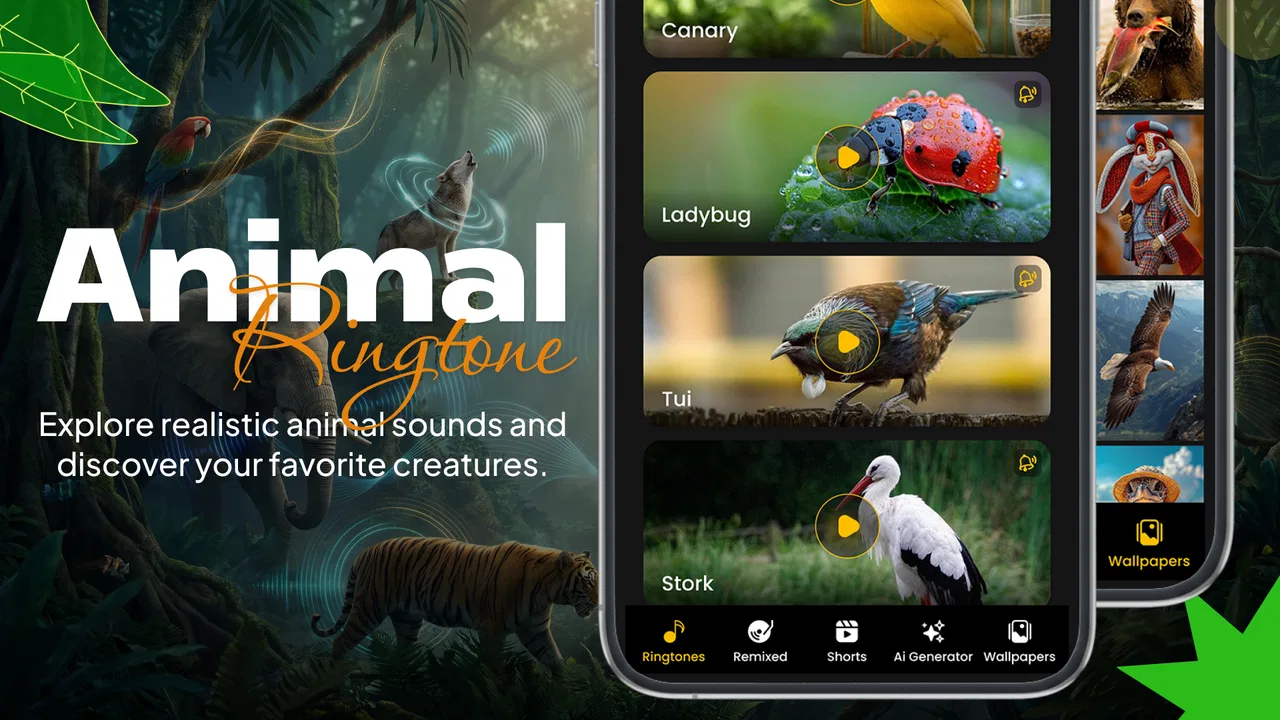
I approached Animal Ringtones as a personalization app rather than just a collection of novelty sounds. Its appeal is easy to understand: instead of relying on the same default notification tones, you can bring animal calls, bird songs, and nature-focused audio into everyday phone use. The idea is playful, but it also has a calmer side when you use the nature sounds as a background for a quiet moment.
The app is made by Airnet Information Technology LLC and is free to install. It belongs to the personalization category, carries an Everyone age rating, and runs on devices using Android 7.0 or later. With a 4.5 average from around 128 thousand ratings and over 10 million installs, it is clearly familiar to a large Android audience. I still think its usefulness depends less on its popularity than on whether you want your phone to sound distinctive without spending time creating audio files yourself.
Where the setup usually becomes confusing
The first thing I noticed is that the app’s simple concept can create several different expectations. A ringtone, a notification sound, an alarm sound, and a relaxing audio track are not used in the same way. If you want a bird song for incoming calls, that is a straightforward personalization goal. If you expect a nature track to keep playing like a dedicated meditation or ambient-sound service, you may find the experience less focused than a specialist app.
You May Also Like

 Pandora - Music & Podcasts
Pandora’s Music Is Easy to Start, but Harder to Recover
Pandora’s strength is its low-effort path from a seed to a station. Its weak spot is how much confidence it asks you to place in connection, setup, and quiet recovery.

 AccuWeather: Weather Radar
AccuWeather Review: A Quick, Clear Forecast for Everyday Decisions
For everyday plans, the best forecast is the one you can understand quickly. AccuWeather makes rain timing, radar, and local conditions easy to act on, with a few trade-offs.

 Hill Climb Racing
Why Hill Climb Racing Still Turns Crashes Into One More Run
A tiny car, a bumpy hill and one more upgrade: Hill Climb Racing keeps resurfacing because its simple chaos makes every near-miss feel personal.

 AliExpress - Shopping App
AliExpress Makes Global Shopping Feel Personal, but Shoppers Bear the Risk
AliExpress turns a global marketplace into a pocket-sized discovery engine. Its reach is useful, its shopping loop compelling, and its trade-offs easy to miss.

 Lords Mobile: Kingdom Wars
Lords Mobile Is a Kingdom-Building Routine, Not a Quick Match
A case-by-case verdict on the building, battles, device demands, and social commitments that make Lords Mobile rewarding for some players and exhausting for others.

 PDF Scanner app - TapScanner
TapScanner Makes Paperwork Easier to Capture, Check, and Share
TapScanner makes scanning with a phone feel less like a rescue operation and more like a dependable step in getting work done. Its capture tools are useful, though not flawless.
More From Our News Desk
View All News


This distinction matters before you start changing settings. A sound can be enjoyable in a preview but unsuitable as a daily alert. Long or gentle audio may be pleasant while you are browsing, yet easy to miss when the phone is in a bag or another room. I recommend testing a candidate sound at the volume you normally use, not only listening through the preview at a comfortable level.
Another common sticking point is knowing whether a change affected calls, notifications, or alarms. Android treats these sound categories separately, and selecting an animal tone in one place does not automatically mean every alert will use it. When something appears not to work, I first identify the exact event I am testing: a phone call, a message notification, or an alarm. That small check prevents a lot of unnecessary reinstalling.
The app also includes AI wallpapers alongside its audio-focused material. That makes it more versatile than a ringtone-only utility, but it can make the first visit feel busier. I found it easier to decide what I wanted before browsing: a recognizable call tone, a softer notification, a wallpaper change, or nature audio for occasional listening. A clear goal keeps the experience from turning into endless scrolling.
The most useful mindset is to treat each sound as a tool for a particular phone event. A loud, distinctive animal call can work well for calls, while a shorter and less dramatic sound is usually better for messages. A peaceful bird recording may be pleasant for personal listening but too subtle for an alert. Matching the sound to the situation is more important than choosing the most unusual option.
What to check before blaming the app
When a selected sound does not seem to appear, I check the phone’s current sound mode first. Silent mode, vibration-only mode, and Do Not Disturb can prevent an otherwise correct ringtone from being heard. This is especially easy to overlook when testing a notification, because the phone may be working normally while intentionally suppressing the alert.
I also check the active volume channel. Android separates media volume from ringtone and notification volume, so raising the volume while listening to a preview may not raise the volume used for an incoming call. If the preview is audible but the real alert is silent, the difference between these controls is one of the first things worth checking.
For wallpapers, I confirm that the change was applied through the phone’s own wallpaper selection flow rather than assuming that viewing an image completed the process. A preview and an applied wallpaper are different steps. If the old image remains after leaving the app, I repeat the selection from the device’s wallpaper controls and check whether the home screen, lock screen, or both are being changed.
It is also worth remembering that the app is free but includes optional in-app purchases ranging from $0.99 to $29.99 per item. I would browse the free material first and pay attention to the purchase screen before confirming anything. The free starting point is useful for deciding whether the sound style fits your phone, while the optional purchases mean the complete browsing experience may not be identical for every user.
A setup routine that avoids most false alarms
My preferred setup routine is deliberately slow. I choose one sound, preview it, and decide which phone category it belongs to before applying it. Then I trigger a real test, such as asking someone to call or sending a test message, rather than judging the result only from the preview. This confirms both the selection and the phone’s current audio behavior.
For a call ringtone, I use a sound with a clear beginning and enough character to be recognized quickly. For notifications, I favor something brief and less intrusive because repeated message alerts can become tiring. For an alarm, I am cautious with gentle nature audio; relaxing sound is not automatically effective for waking up.
If you are setting up a phone for another person, I suggest recording the chosen category in plain language, such as “bird call for calls” or “short animal sound for messages.” This is more practical than expecting the person to remember where every setting came from. It also makes later troubleshooting much easier because you know what was intended.
On an older device, I would keep the first customization modest. Apply one ringtone or wallpaper, test it, and only then continue. This creates a clear checkpoint. If several changes are made at once, it becomes difficult to tell whether the problem comes from the app, the phone’s sound settings, or simply a missed confirmation step.
Recovering when a sound or wallpaper seems lost
If the selected item disappears after restarting the phone, I would begin with the system’s current ringtone or wallpaper setting rather than immediately clearing the app. The phone may have reverted to a previous choice, or the selected category may not be the one being tested. Reopening the relevant Android setting and selecting the sound again is a safer first recovery step.
When a preview works but the applied sound does not, I repeat the process with a different item. This helps separate a problem with one selection from a broader issue with the phone. If the second sound behaves normally, the original choice may simply be a poor fit for that alert type, particularly if it is quiet or difficult to notice.
For a notification that arrives silently, I check whether the individual app sending the notification has its own notification behavior. Android can manage notification categories separately, and a global notification sound does not always override a setting chosen by the messaging, email, or social app itself. In that situation, changing the tone inside Animal Ringtones may be correct while the other app continues using its own channel setting.
For calls, I check contact-specific assignments as well. Some phones allow an individual contact to use a separate ringtone, so a general animal ringtone may work for most callers but not for one person. That can look like a failed installation when the phone is actually following a more specific contact rule.
Wallpaper recovery is similar. If the image appears on the home screen but not the lock screen, I check which screen was selected during application. If it looks stretched or cropped, I would try a different image orientation or adjust the phone’s wallpaper crop rather than assuming the source image is defective. Different displays frame the same image differently, so a result that looks good in a preview may need a small adjustment on the device.
I avoid repeatedly tapping apply while several system dialogs are open. A better workflow is to finish one action, return to the home screen, and verify the result. If the phone asks for confirmation, I read the wording carefully and complete that step. This sounds obvious, but it is one of the easiest places for a customization workflow to stop halfway.
When the phone, not the app, is responsible
There are cases where troubleshooting inside the app will not help. If all sounds are quiet, the phone’s speaker, volume level, Bluetooth connection, or system audio mode deserves attention. A phone connected to headphones or another audio device can make a ringtone appear missing when it is simply being routed elsewhere.
Battery-saving behavior can also affect how quickly an app opens or how reliably background audio behaves. I would not treat a delayed screen refresh or a slow preview as proof that the sound file is unusable. Closing other demanding apps, reopening the personalization app, and testing again gives a cleaner result than changing several settings at once.
Storage pressure is another practical consideration. A device with very little free space can behave unpredictably when saving new media or applying visual changes. Checking available storage is a sensible general maintenance step if wallpapers fail to apply or the app repeatedly returns to an earlier screen.
System updates and manufacturer interfaces can change where sound controls are located. The same task may be presented differently on two Android phones, even when both meet the app’s minimum requirement. That is why I focus on the actual phone category being tested instead of assuming the app controls every part of the process.
I would also skip this app if your main goal is a full-featured audio editor, a large music library, or a dedicated sleep-sound system. Its strength is quick personalization around animal and nature themes. Someone who wants precise trimming, layered sound mixing, advanced scheduling, or a highly specialized relaxation experience will likely be better served by an app built specifically for that purpose.
How it compares with ordinary alternatives
The usual alternative is to stay with the phone’s built-in tones. That is simpler and often more predictable, especially for users who want a clean, professional sound with no browsing. The trade-off is personality. Animal Ringtones gives people a faster way to move beyond the small collection bundled with the device, particularly if they enjoy recognizable wildlife or bird audio.
Another alternative is downloading individual audio files and assigning them manually. That approach offers more control over the exact file, but it also adds work: finding a suitable recording, saving it in a usable location, and navigating Android’s selection menus. This app is more convenient when you want themed choices without managing files yourself.
Compared with a dedicated wallpaper app, its visual side is appealing mainly to people who enjoy combining sound and appearance around a nature theme. A wallpaper specialist may offer more advanced browsing or editing tools, while this app is more coherent for someone who wants an animal-oriented phone identity rather than a general design catalog.
The relaxing nature sounds are a useful extra, but I would not confuse them with a complete wellness routine. I like them for a short break, quiet reading, or creating a calmer atmosphere. If you need timers, structured sessions, or detailed audio controls, a dedicated ambient or meditation app is likely the better choice.
Small habits that make the app more useful
One practical habit is to reserve the most distinctive animal sound for calls and use a gentler bird or nature sound for messages. This creates an audible hierarchy: important calls stand out, while frequent notifications do not become irritating. It is a simple way to personalize the phone without turning every alert into a loud interruption.
I also recommend keeping one familiar default tone available. If you are in a workplace, classroom, waiting room, or shared home, an unusual animal call may attract more attention than you want. Switching back temporarily is easier when you remember which system sound you previously used.
For families, different sounds can help identify whose phone is ringing without looking at the screen. That works best when each person chooses a clearly different sound rather than several similar bird songs. The benefit is practical, not merely decorative: in a busy room, sound can tell you whether an alert needs your attention.
Another useful trade-off concerns repetition. A sound that makes you smile the first day may become annoying after hundreds of notifications. I would use the app to create a small rotation of purposeful choices rather than changing tones constantly. The best customization is one that remains pleasant after the novelty fades.
The app’s current version is 3.251, and it supports Android devices from version 7.0 onward. That broad compatibility makes it approachable for people who are not using a recent phone, though the exact appearance of settings can still vary by manufacturer. I would judge performance on the actual device, especially if it is older or has limited storage.
My practical verdict
After using it as a personalization tool, I see Animal Ringtones as a friendly choice for people who want their phone to feel less generic. The combination of animal calls, bird songs, nature audio, and AI wallpapers gives it more range than a basic ringtone picker. The free entry point makes it easy to explore, while the optional purchases mean I would decide carefully before paying for additional items.
Its biggest strength is convenience: you can start with a theme and quickly turn it into a call sound, notification choice, or visual change. Its biggest weakness is that the final result still depends on Android’s own sound modes, notification rules, wallpaper controls, and device behavior. When something fails, the cause may be outside the app, so a calm category-by-category check is more effective than repeated tapping.
I would recommend it to anyone who enjoys playful personalization, wants nature-inspired audio, or needs a more recognizable ringtone for a family member. I would be less likely to recommend it to someone seeking professional audio control, a serious relaxation platform, or the most minimal possible phone setup. For the right user, though, it adds character without requiring manual file management.
My advice is to begin with one call ringtone, test it in a real situation, and then add a notification sound only if the first change behaves as expected. That workflow keeps troubleshooting simple and helps you discover whether the app’s style suits your daily routine. If you enjoy the result, the wallpapers and relaxing sounds are worthwhile extras; if not, the app has still made it easy to experiment without committing to a complete phone redesign.
FAQs for Animal Ringtones
01What is Animal Ringtones and what does it offer?
Animal Ringtones is a mobile app that provides a collection of animal sounds and themed ringtones for customizing calls, notifications, alarms, and contacts. During testing, the app was easy to browse, with sounds generally organized by animal or category. It is intended for users who want playful alternatives to standard system tones, although the exact selection and available features may vary between Android and iOS versions.
02Can I use the sounds for calls, notifications, alarms, and individual contacts?
Most animal ringtone apps allow downloaded sounds to be assigned to different purposes, including incoming calls, text messages, alarms, and selected contacts. However, the setup process depends on the operating system. Android usually offers more direct ringtone controls, while iPhone users may need to save or export a tone through Apple’s supported ringtone workflow. Check the app’s instructions before downloading if contact-specific tones are important to you.
03Is Animal Ringtones free to download and use?
The app may be available as a free download, but some sounds, categories, or customization tools can be restricted behind advertisements, in-app purchases, or a premium subscription. Free versions may also display promotional content while browsing or downloading tones. Before installing, review the store listing carefully for pricing details, trial conditions, and recurring subscription information so you understand which features are included without payment.
04Does Animal Ringtones require an internet connection?
An internet connection may be needed initially to load the sound library, display advertisements, or download individual animal tones. Once a sound has been saved to your device, it may work offline as a ringtone or notification, depending on the operating system and the way the app exports files. Availability can differ by version, so it is best to download your preferred sounds before traveling or using the app without mobile data.
05Is Animal Ringtones safe and compatible with my device?
The safest approach is to download Animal Ringtones only from the official Google Play Store or Apple App Store and check the listed developer, permissions, ratings, and recent reviews. Ringtone apps commonly request access related to storage, media, or notifications, but permissions should match their advertised functions. Compatibility depends on your Android or iOS version, and some older devices may not support every sound format or customization option.
Pros
- Large collection of animal sounds for calls
- alarms
- and notifications.
- Funny options include pets
- farm animals
- birds
- and wild creatures.
- Simple interface makes browsing and previewing tones quick.
- Ringtones can be assigned to specific contacts on supported devices.
- Many sounds work offline after being downloaded to the device.
Cons
- Sound quality varies noticeably between different animal recordings.
- Some tones may feel repetitive after regular daily use.
- Advertising can interrupt browsing and sound preview sessions.
- Device permission settings may complicate saving or assigning tones.
- The app may require extra steps on iOS to set custom ringtones.

Animal Ringtones
Gallery